

Prerequisites
Before you start, make sure you:- Install the Turso CLI
- Sign up or login to Turso Cloud
- Have a Koyeb account - create one
1
Retrieve database credentials
You will need an existing database to continue. If you don’t have one, create one.Get the database URL:Get the database authentication token:Assign credentials to the environment variables inside
.env.You will want to store these as environment variables.
2
Fork one of the following embedded replica project from GitHub
My Expenses Tracker - (Elysia + Bun)
See the full source code
Web Traffic API - (Rust)
See the full source code
Or, you can:
Deploy to Koyeb with a single-click
3
Add a new Koyeb app
- Create a new app in the Koyeb control panel.
- Select GitHub as the deployment option.
- Import the GitHub project to Koyeb.
4
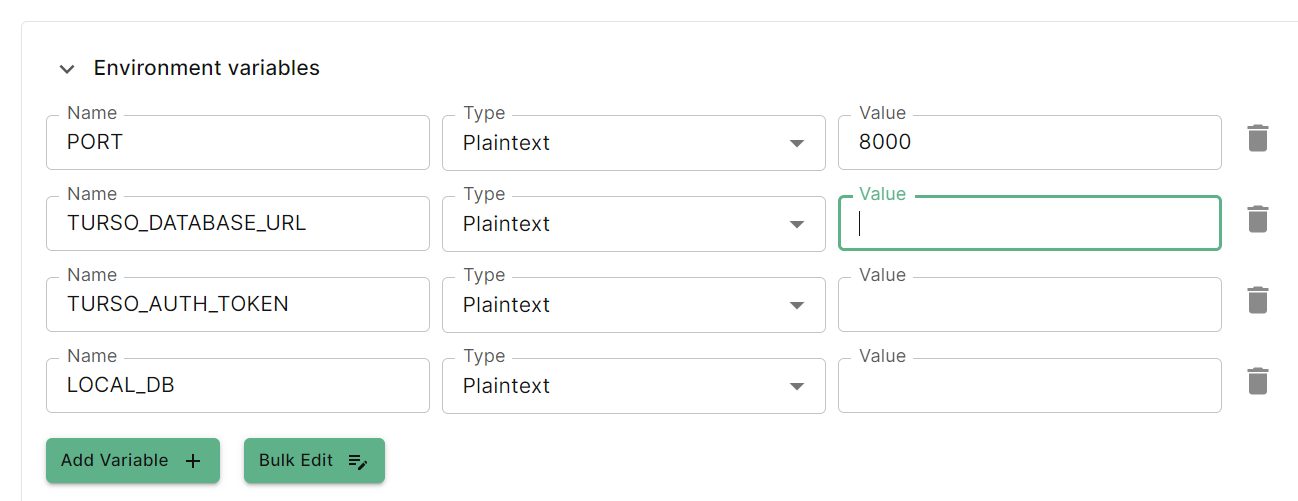
Fill in the environment variables on Koyeb's deploy page
5
Deploy
Click the Deploy button at the bottom to deploy your web service.